
Understanding the Order Detail Page
1. Overview
Section titled “1. Overview”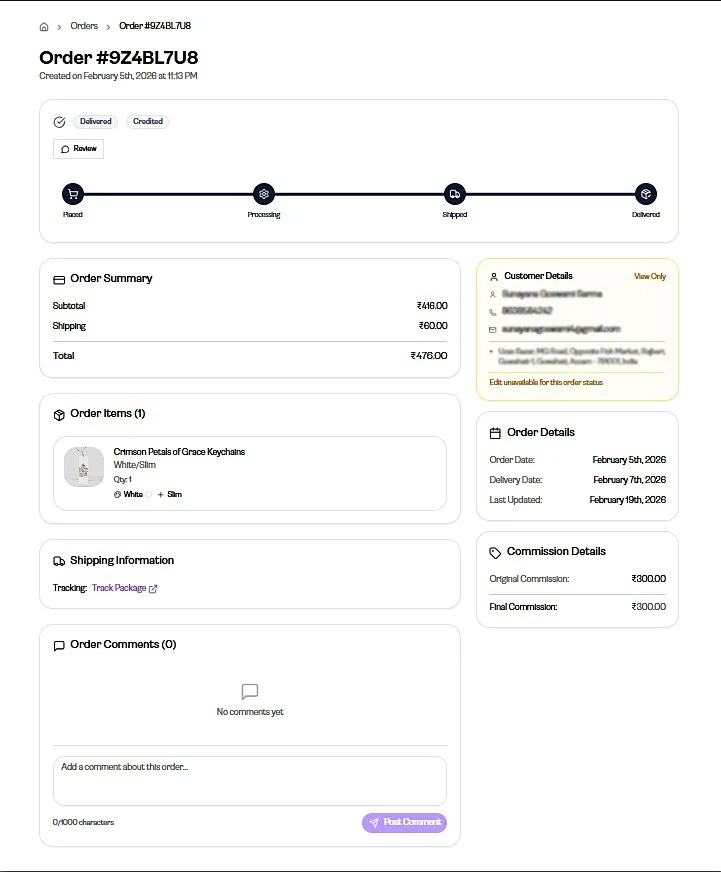
The Order Detail page shows complete information about a single order. From here, you can view order details, track its status, and take actions on the order.
2. Order Status & Timeline
Section titled “2. Order Status & Timeline”Each order moves through stages:
- Placed
- Processing
- Shipped
- Delivered
A Review option may also be visible based on the order stage.
3. Order Summary
Section titled “3. Order Summary”This section shows:
- Subtotal
- Shipping
- Total
It provides a quick overview of the order value.
4. Order Items
Section titled “4. Order Items”This section lists all products in the order.
It includes:
- Product name
- Variants (size, color, etc.)
- Quantity
5. Shipping Information
Section titled “5. Shipping Information”This section shows delivery-related details.
- Tracking information may be available
- You can use Track Package to check delivery status
6. Customer Details
Section titled “6. Customer Details”This section shows:
- Customer name
- Phone number
- Address
You can edit customer details:
- Click on any field to edit
Important:
Customer details can only be edited until the order moves to processing.
7. Order Details
Section titled “7. Order Details”You can also view:
- Order Date
- Delivery Date
- Last Updated
This gives you a quick timeline of the order activity.
8. Actions
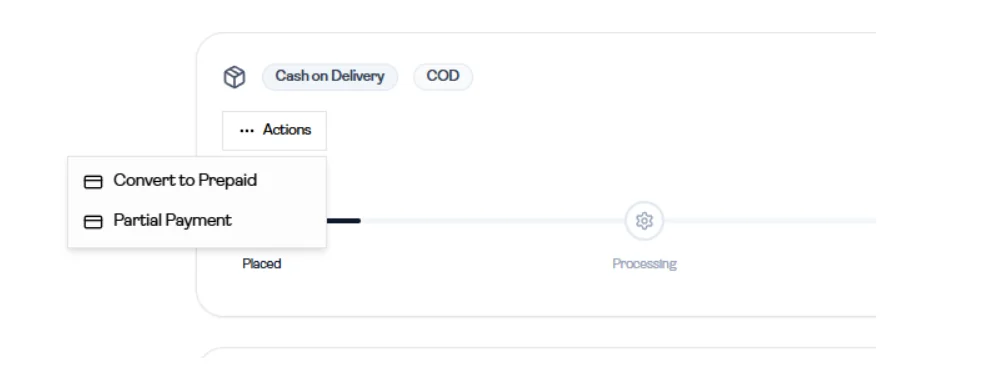
Section titled “8. Actions”Based on the order type, available actions may include:
- Convert to Prepaid
- Partial Payment
These actions help manage payment-related changes.
9. Order Comments
Section titled “9. Order Comments”You can add comments to the order.
Use cases:
- Internal notes (for yourself or your team)
- Communication with the Gogopogo team
Important:
If the comment is meant for the Gogopogo team, it must be added before the order moves to processing.
10. Commission Details
Section titled “10. Commission Details”This section shows the earnings from the order.
It includes:
- Original Commission
- Final Commission
This helps you understand how much you earn from the order and any final adjusted amount.
11. Boundaries
Section titled “11. Boundaries”This page is for viewing and managing a single order.
- It does not cover fulfillment, shipping operations, or backend processes
- Some actions may not be available once the order progresses to the next stage