
How to Set Pricing for Your Product
Setting the right price is one of the most important decisions for your store. A good price balances profit, competitiveness, and customer perception.
This guide will walk you through exactly how to set your product pricing step by step.
1. Start with Your Base Cost
Section titled “1. Start with Your Base Cost”Every product already has a base cost, which includes:
- Fulfillment cost
- Print cost
These costs are managed by Gogopogo and already include all production and handling charges.
Together, this becomes your Total Cost.
You don’t need to worry about production expenses separately. Just focus on how much profit you want to earn on top.
2. Decide Your Profit (Commission)
Section titled “2. Decide Your Profit (Commission)”Your earnings come from the commission you add on top of the base cost.
Formula
Section titled “Formula”Selling Price = Total Cost + Your Profit
How to choose your profit?
Section titled “How to choose your profit?”- ₹150–₹250 → Better for higher conversions
- ₹250–₹400 → Balanced approach
- ₹400+ → Premium positioning
Keep margins slightly lower in the beginning to get more sales and validate your product.
Even if you set your profit to ₹0, you won’t incur a loss — you simply won’t earn anything on that sale.
3. Use Bulk Pricing to Save Time
Section titled “3. Use Bulk Pricing to Save Time”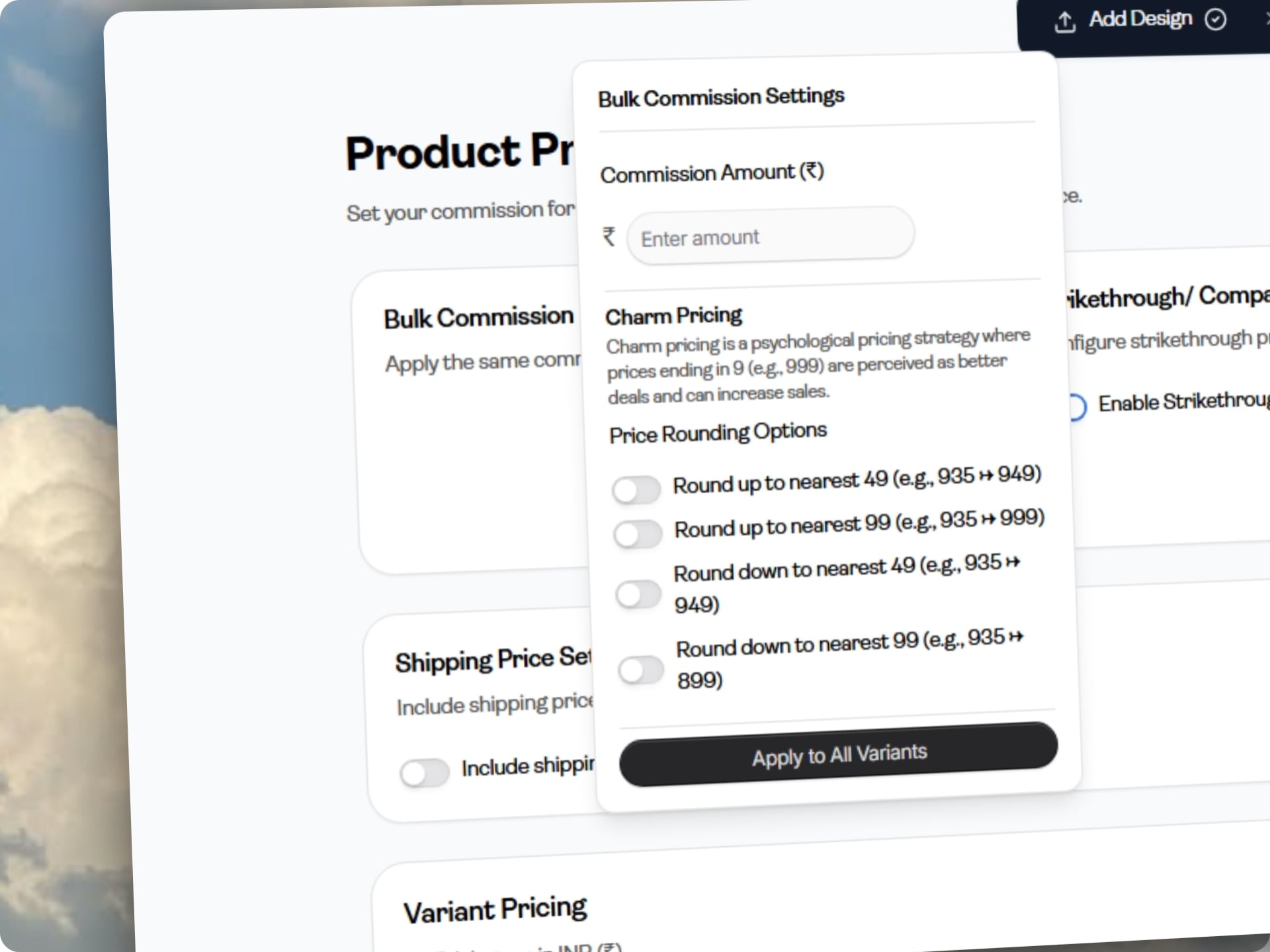
If your product has multiple variants (sizes, colors), setting prices one by one can be slow.
Use Bulk Commission Settings to:
- Apply the same profit across all variants
- Launch products faster
- Maintain consistent pricing
You can always fine-tune individual variants later.
4. Adjust Pricing Per Variant
Section titled “4. Adjust Pricing Per Variant”Not all variants cost the same.
For example:
- Larger sizes (2XL, 3XL) cost more
- Some colors may have different production costs
If you keep the same price for all variants, your profit may vary across them.
Make small adjustments to maintain consistent margins.
5. Use Charm Pricing (Why It Matters)
Section titled “5. Use Charm Pricing (Why It Matters)”Charm pricing is a psychological pricing technique:
- ₹499 feels cheaper than ₹500
- ₹999 feels like a better deal than ₹1000
Customers tend to focus on the first number, which makes prices ending in 9 more attractive.
In your pricing settings, you can:
Section titled “In your pricing settings, you can:”- Round prices to ₹49 or ₹99
- Apply this across all variants
This small change can improve conversions without actually reducing your profit.
6. Use Strikethrough Pricing to Increase Conversions
Section titled “6. Use Strikethrough Pricing to Increase Conversions”Customers naturally look for deals. Strikethrough pricing helps you highlight value.
Example
Section titled “Example”- Selling Price: ₹549
- Compare-at Price: ₹799
This makes the product feel like a discounted offer, even if your margin remains healthy.
How to set it correctly
Section titled “How to set it correctly”Instead of randomly increasing the original price, think of it as:
👉 “What would this product reasonably sell for in the market?”
Your strikethrough price should reflect:
- The perceived value of your design
- Market pricing of similar products
- A believable higher price point
Keep the difference meaningful but realistic. This builds trust while still improving conversions.
7. Decide Your Shipping Strategy
Section titled “7. Decide Your Shipping Strategy”Shipping pricing depends on the type of product:
For Indian Products 🇮🇳
Section titled “For Indian Products 🇮🇳”- You can include shipping in the product price
- This allows you to offer “Free Shipping”, which often improves conversions
For Global Products 🌍
Section titled “For Global Products 🌍”- Shipping price cannot be included in the product price (currently)
- It will be calculated separately
For Indian products, including shipping usually performs better as customers prefer all-inclusive pricing.
8. Estimate Your Earnings
Section titled “8. Estimate Your Earnings”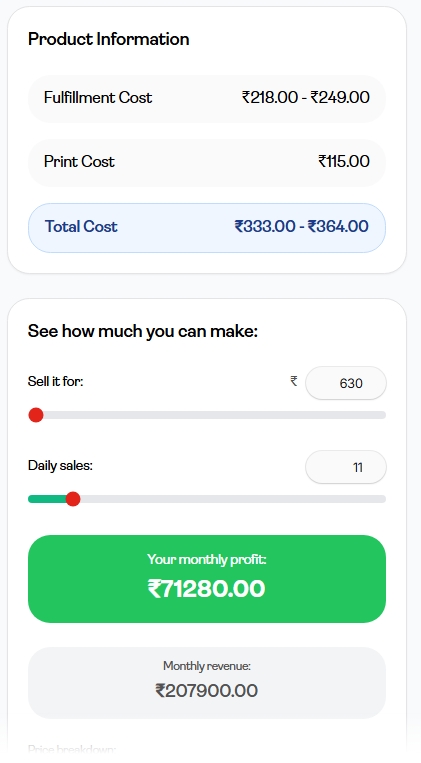
You can adjust:
- Selling price
- Expected daily sales
To get an estimate of:
- Monthly revenue
- Monthly profit
This helps you understand how pricing changes can impact your overall earnings.
9. Finding the Right Price
Section titled “9. Finding the Right Price”There is no single perfect price. The best approach is to test and optimize.
Simple strategy:
Section titled “Simple strategy:”- Start with a reasonable margin
- Use charm pricing (₹499 / ₹549 / ₹599)
- Add a strikethrough price
- Observe performance
Then adjust based on:
- Sales
- Conversion rate
10. Common Mistakes to Avoid
Section titled “10. Common Mistakes to Avoid”- Setting prices too high without strong brand value
- Not using charm pricing
- Using unrealistic strikethrough prices
- Focusing only on profit instead of conversions
Final Thought
Section titled “Final Thought”Pricing is not just about numbers — it’s about how customers perceive your product.
A well-priced product:
- Feels like a good deal
- Looks premium
- Still gives you solid profit